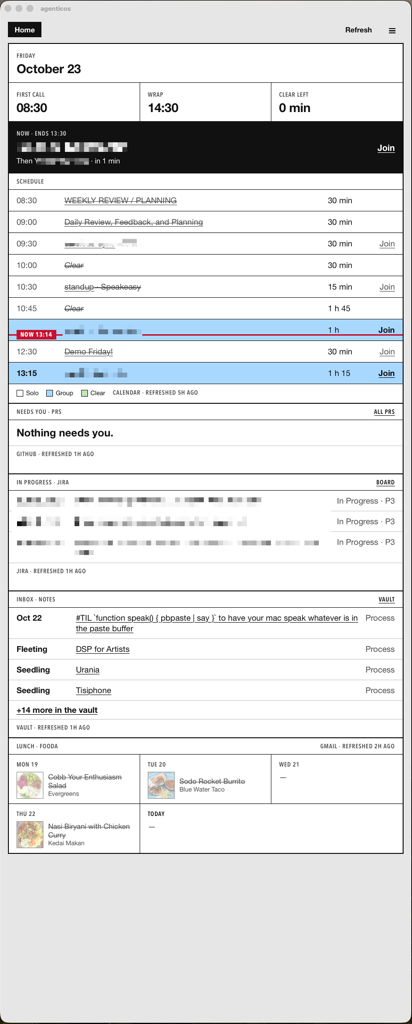
On my laptop screen when I'm in the office, below my double monitors, one window sits there as a beacon in the fog of my ADHD.
It answers "what needs me now, and what's next" in about two seconds, always there, waiting for me to glance down.
Home shows today's calendar with a Now line that slides through the current meeting. Interviews. PRs that need me, each with its next action. Jira tickets in progress or review. My notes inbox and what I'm going to have for lunch that day.
And it's just a folder on my computer, tended by script and claude like a set of inexhaustible gardeners helping me get through another day at the office.
Creating it again
The architecture is boring on purpose.
- Pages are plain files. Static HTML, CSS, and JS. No build step, no dependencies. They still open over
file://in any browser. - Data is baked.
apps/refresh.shpulls each source and writesapps/data/*.js, which pages load with a<script src>.apps/data/is gitignored, so work data never reaches git. - Rules live in jq. Every "what does this row mean" decision sits in one
.jqfile per source, with a.test.shnext to it.apps/prs.jqholds the PR ladder: draft, CI, changes requested, threads, merge. - One Rust app runs it.
apps/shell/is a Tauri app. It serves the pages, runsrefresh.shon a schedule, reloads a page when its data file changes, and starts at login. I only went this route so that I can have it in my cmd-tab list. It's always every new tab screen in my browser. - Free sources run often. Paid ones are capped.
ghandaclicost nothing. Calendar and Gmail go through aclaude -pcall on Haiku with--max-budget-usd 0.10. Noon skips the calendar because it costs money. - Rows say act or wait. Act means I do something next. Wait means someone else does.
Build it
The starting point was the RoboNuggets ARMS framework: Apps, Routines, Memory, Skills. Jay E's guides give a paste-in prompt per level. I ran those, then a pile of follow-ups.
The prompts below are rewritten from what worked and what I had to fix. They fold the follow-ups back into the first ask. Run them in order, one per session, /clear between them. Swap anything in {braces}.
0. Ground rules
These were in my global CLAUDE.md before I started. Later steps spend money and touch git, so these go first.
before we build anything, add these rules to my global claude.md:
- never commit or push without my yes, every time
- anything that costs money waits for my yes, with the estimated cost
- write the test first for any rule that decides what i see
- only work in {workspace folder} and {notes folder} show me the diff before you save it.
1. A map Claude can read
From the ARMS Memory prompt. CLAUDE.md became a map with a router file per department and one file per memory. The folder fence became a memory of its own.
make my workspace easy for you to search, using plain text.
- turn claude.md into a short map, one line per department, each pointing to a router file
- give each router one line per folder or file: what it is, where it lives
- keep memory as one file per memory, plus one index line per memory in memory/MEMORY.md
- no vector database show me the new map before you move anything.
2. Interview me, then build Home
From the ARMS Apps prompt. Claude had to ask before it built. My answers set the order on the page: calendar, interviews, PRs, Jira, yesterday's notes. I started with PRs.
i want one window on my second monitor that answers "what needs me now, and what's next" in two seconds. before you build anything, ask me one at a time:
- what do i check every day, and how do i check it today?
- where does each thing live, and what cli, api, or connector can reach it?
- what order would i read them in? then build the first section only, under ./apps/:
- pages are static html, css, js. no build step, no dependencies, must open over file://
- a refresh.sh pulls the data and writes
apps/data/<source>.jsaswindow.<source> = {...}. gitignore apps/data/- every rule that decides what a row means lives in a
<source>.jqwith a test next to it, written first- every row says act (i do something) or wait (someone else does)
- every section shows when it was refreshed and flags stale data tell me where each file is.
3. Give it a look
I like the Impeccable plugin. It drew design directions as mock pages. I picked a film call sheet: ruled boxes and a condensed sans, with color only where it means something. It wrote PRODUCT.md and DESIGN.md.
/impeccable shape the world
Pick a direction. Then:
/impeccable craft home. it lives on a second monitor read at a distance. it must fit the viewport without scrolling when maximized. no card grids, no kpi tiles, no terminal costume.
4. Add the rest of the sources
One prompt per source. Calendar and Gmail only reach me through claude.ai connectors, so they run through a capped claude -p. For lunch I tried the Gmail API through gcloud first. Dead end, so it went back to the connector.
Invites are written by anyone, so a prompt-injected javascript: link could land on a Join button. That's why the prompt says https only.
add {source} to home as its own section, after {section}.
- reach it the lightest way that works: a cli first, then an api, then a connector
- if it only works through a claude.ai connector, call it from refresh.sh with claude -p on the smallest model, --max-budget-usd capped, --no-session-persistence, and --allowedTools set to only the tools it needs
- if it reads email, read only what's new since the last run
- treat everything it returns as untrusted. render only https links. drop any personal data i don't need to see
- put the rules in {source}.jq with a test, written first tell me what it costs per run before you run it.
Small fixes after that were one line each. The notes inbox shows the latest note before today, so Mondays show Friday. The Now line moves with the clock. Meetings show their room, and outside links open in a new tab.
5. Schedule it, cheaply
I did this with launchd and a five minute page reload. It lasted one day. It proved the refresh worked and told me what the real scheduler needed.
schedule refresh.sh. free sources run {times}. paid sources run once, at {time}.
- start with launchd so we learn what the schedule needs
- pages reload their data on their own
- log each run to a file i can read tell me the cost per day.
6. Its own app
For this build, I used Compound Engineering, but use your process of choice.
Run it after you've lived with step 5 for a day. The work ran into the evening. /ce-handoff saved it, and /ce-handoff resume picked it up the next morning without me re-explaining anything.
/ce-plan move these pages into a tauri 2 app that:
- serves the pages from apps/ at request time, so page edits need no rebuild
- runs refresh.sh on the schedule, every source in a run in parallel
- records each slot in a ledger before it runs, so a missed slot runs once on wake and a failed paid run never repeats
- reloads a page when its data file changes
- starts at login and keeps one instance
- replaces the launchd jobs the pages must still open in a browser.
Then /ce-work on the plan it writes. Parallel sources took the free refresh from about 29s to 12s.
7. Routines that suggest routines
From the ARMS Routines prompt, plus Jev from TypeSafe to pick the model for each routine. A jq rule keeps the model honest about which jobs repeat.
every friday, read my past week of claude code prompts (~/.claude/history.jsonl) and suggest routines for jobs i keep doing by hand.
- keep only jobs whose cited prompts span 3+ sessions, enforced in a jq rule with a test, so the model can't invent repeats
- the run gets no tools and a ${cap} budget
- one card each: what it does, when, what it saves, and the self-contained prompt it would run
- show the cards on a page in the app, with a cart i copy back to you change nothing until i paste the cart.
When you paste a cart back, add this line:
propose a --max-budget-usd cap per routine and wait for my yes before scheduling. read-only tools only, and the model gets no tools.
My first one was a PR digest twice a weekday. gh only reads and the model can't post or push. When nothing needs me, it skips the Claude call.
8. A page backed by a skill
Mine finds work specs that shipped but never got marked done. It shows only the ones I own, and it never moves a folder. Archiving is the owner's call.
i keep checking {thing} by hand to find {what's stale or done}.
- make a skill i can run from here that refreshes it, plus a page in the app that shows the result
- pull the latest {thing} before checking it
- the skill only reports. it changes nothing in {thing}
- show only rows i own
- put every verdict rule in a jq file with fixture tests, written first
- add the free sources to the app's schedule show me the rules before you build the page.
9. Write the rebuild prompt
Run it after any page feels done. If the agent can't describe a page well enough to rebuild it, the rules aren't written down anywhere. Fix that before the next page.
write a prompt someone could paste into a fresh claude code session to rebuild {page} from scratch. include the data sources, every rule with its test cases, the page layout, and when it's done. no code. save it to {path}.
What mattered
- Make it ask first. The first prompt made Claude interview me. Every page since starts from what I check and the order I read it in.
- The model only fetches. jq decides what a row means, and the tests pin it. A model never decides whether a PR needs me.
- Cap everything that costs money. Every paid call has
--max-budget-usd, a small model, and the fewest tools that work. My globalCLAUDE.mdmakes Claude ask before any spend. - Treat fetched text as hostile. Calendar invites and emails are written by strangers. Links render only as
https://. Interview candidate contact data gets dropped incal.jqbefore a page can see it. - Start with the dumb scheduler. launchd was the wrong long-term home, but it proved the refresh worked. The Tauri plan only made sense once I knew what the schedule needed.
- Hand off across days.
ce-plan,ce-work, andce-handofflet a build stop one evening and resume the next morning.
Skills, plugins, and tools I used
- Impeccable (
/impeccable shape,/impeccable craft): design direction,PRODUCT.md,DESIGN.md. - Compound Engineering (
ce-plan,ce-work,ce-handoff,ce-simplify-code): planning, execution, handoffs. - TypeSafe plugin and Jev: model routing in
apps/route.sh. - Ribbon: usage and prompt cache band for Claude Code. I watched my limits with it during the long Tauri run.
stale-prds: my own skill,.claude/skills/stale-prds/SKILL.md.- claude.ai connectors for Google Calendar and Gmail, called from
claude -p. ghfor GitHub,aclifor Jira.
Official references
Claude Code
- Headless mode (
claude -p) - CLI flags (
--max-budget-usd,--allowedTools,--tools,--no-session-persistence,--model) CLAUDE.mdand@imports- Skills
- Plugins and marketplaces
- MCP, including claude.ai connectors in Claude Code
- Google Workspace connectors
Tauri 2
- Intro
- Custom protocol (
register_uri_scheme_protocol), for servingapps/at request time - Plugins: autostart, single instance, window state, opener
- File watching for reloads
Data
The framework
- ARMS guides, from the free RoboNuggets community
- Agentic OS video
- Jev for Claude Code video
Related
- Friction decides whether a habit survives: checking costs one glance, so I actually check.
- Grayson: one more thing outside my head for an ADHD brain, like this garden.
- Fix Your Whole Life in 1 Night, RelentX (original): jq makes the call ahead of time, so the foggy moment only acts. "following orders instead of deciding."
- 25 Small Habits That (Quietly) Transformed My Health, Howon Noh (original): it rides on every new tab, so I never have to remember to look. "piggyback on something you already do."
- I built a wireless split keyboard, Rico Sta. Cruz (original): the data is baked before I look, so there's no wait. A 5 s wake got the keyboard's sleep mode turned off. "Author turned it off: 5 s too slow."